
Prompt guide
Complete guide for Chibi Sticker Diary Portrait
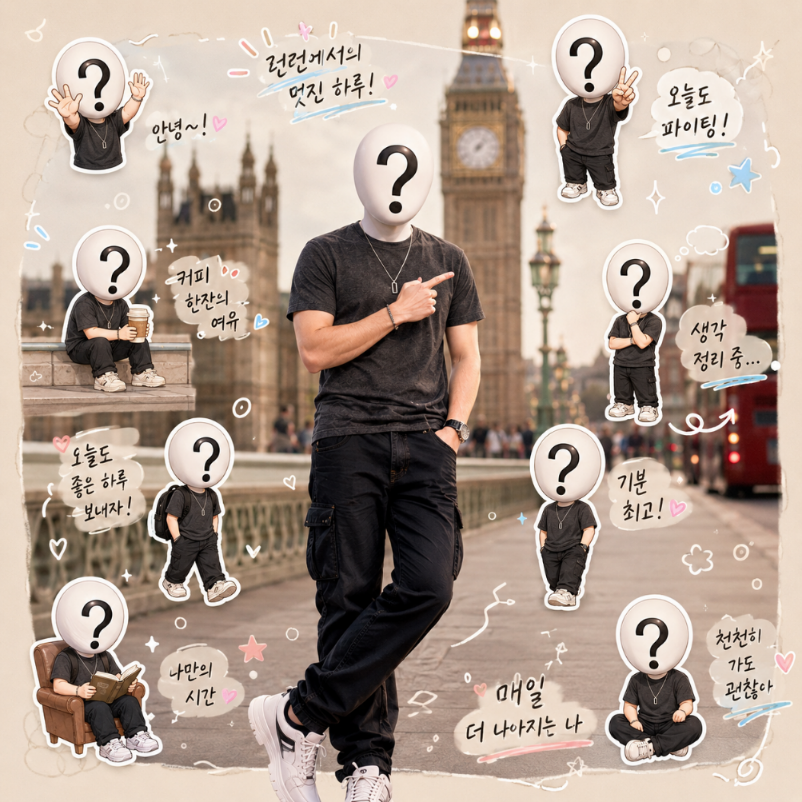
The Chibi Sticker Diary Portrait prompt turns an uploaded real-life photo into a cozy lifestyle collage with a photorealistic main subject surrounded by miniature chibi sticker versions of the same person. It is designed for social media, personal edits, diary-style visuals and playful identity-based portraits. The key idea is not to transform the entire image into a cartoon. Instead, the main person stays realistic, while cute chibi clones, doodles, handwritten phrases and scrapbook elements add a charming diary aesthetic around them.
This prompt is especially strong because it preserves the subject's identity across multiple visual layers. The real person should keep their facial structure, hairstyle, clothing, pose and lighting, while each chibi sticker should still resemble them through hairstyle, glasses, outfit colors and overall appearance. That identity consistency makes the result feel personal and custom instead of generic. The stickers become playful mini versions of the same person, not random cute characters.
The city field adds atmosphere and cultural flavor. The prompt can place the diary portrait in a subtle city-inspired context, using local vibes, language cues and small environmental references without overwhelming the main subject. It also adapts the handwritten diary phrases to the selected city, which can make the image feel more localized and expressive. The overall style stays cozy, polished and shareable, with neutral backgrounds, pastel accents, hearts, sparkles, arrows, speech bubbles and soft sticker shadows.
The composition is carefully controlled. The prompt asks for six to eight chibi clones around the edges, each with a unique pose and everyday emotion, while protecting the main subject's face and body from being blocked. This matters because sticker collages can quickly become cluttered. By defining placement, mood, doodles, typography and quality rules, the template guides the AI toward a clean vertical layout similar to an Instagram diary post or scrapbook page.
Use this prompt when you want a cute portrait that feels personal, warm and full of personality. It works well for profile content, friendship edits, travel-inspired posts, birthday visuals, lifestyle creators, fashion moments, fan edits and casual self-expression. The best input is a clear photo of one person with visible face, hairstyle and outfit. The stronger the reference, the better the chibi clones can resemble the subject while still feeling adorable and stylized.
How to use this prompt
- 1
Upload one real-life photo of a person with a clear face, hairstyle and outfit. The prompt uses these details to keep the main subject realistic and to design matching chibi stickers.
- 2
Select the city that should influence the atmosphere and diary phrases. The city should add subtle local style, not replace the subject or turn the image into a busy travel scene.
- 3
Copy the full prompt with the chosen city and aspect ratio. Keep the rules about not blocking the main face and making each chibi resemble the same person.
Best use cases
Lifestyle creators can use this prompt to make personal, cute and highly shareable posts that feel like a visual diary entry.
Friends and fans can create playful edits for birthdays, celebrations, travel memories or affectionate character-style portraits.
Fashion, beauty and personal-brand content can use the chibi stickers to show multiple moods, poses and micro-stories around one central portrait.
Tips for better results
Use a photo where the outfit is visible. The chibi stickers become more recognizable when they can repeat the same clothing colors and style.
A vertical aspect ratio usually works best because it gives space for the main subject, stickers, doodles and handwritten diary phrases.
If the result feels cluttered, regenerate with the same prompt and a cleaner reference photo. The instruction to keep stickers around the edges helps protect the subject.
Common mistakes to avoid
A common mistake is using a group photo. The prompt is built around one main person and multiple chibi versions of that same individual.
Another mistake is choosing a very dark or blurry image. The chibi clones need clear identity cues such as hair, glasses, face shape and clothing.
Do not remove the composition rule that prevents stickers from blocking the face. Without it, the collage can cover the most important part of the portrait.
Final recommendation
Use the Chibi Sticker Diary Portrait prompt when you want a realistic personal photo enhanced with cute, identity-matching stickers and cozy scrapbook details. A clear single-person image, a fitting city and the full structured prompt help the AI create a polished diary-style portrait that feels personal rather than generic.