

Prompt guide
Complete guide for Subway Billboard Self-Campaign
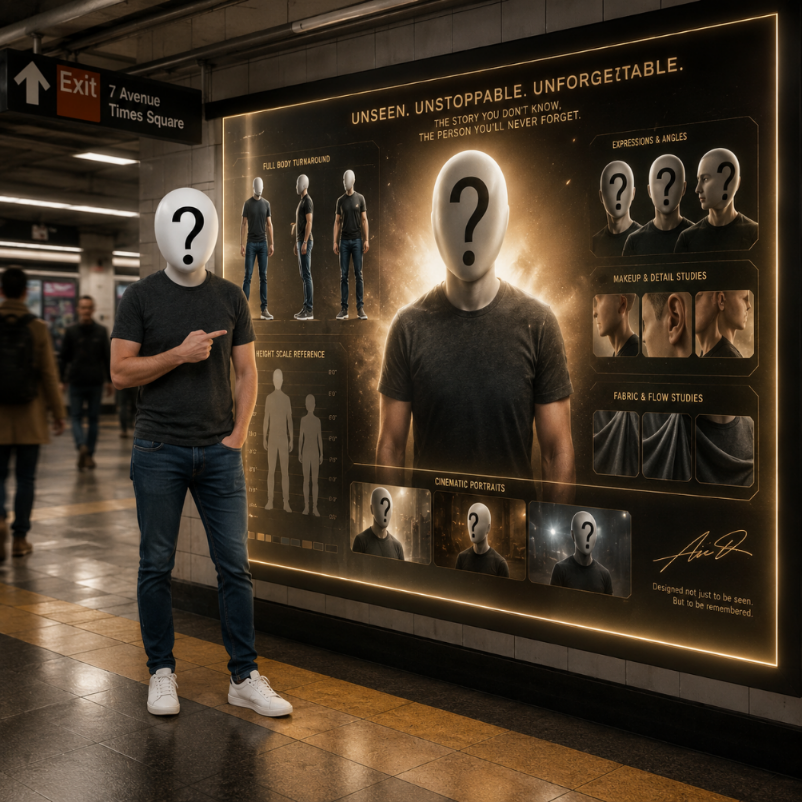
The Subway Billboard Self-Campaign prompt creates a cinematic scene where the uploaded person appears inside a realistic subway platform, standing proudly in front of a glowing LED advertisement that features their own polished campaign image. The concept turns a personal photo into a larger-than-life urban advertising moment: the real person is grounded in the station, while the screen shows an idealized fan-art campaign version of the same individual.
This template is built for identity-based storytelling. The uploaded photo gives the AI the face, general likeness and personal reference, while the city field changes the surrounding subway architecture and atmosphere. A New York version can feel like a busy metropolitan platform, a Paris version can suggest tiled elegance and fashion energy, while a Tokyo or Seoul version can lean into bright modern transit design. The selected city should influence the environment, signage, mood and cultural cues without replacing the person or making the image feel like a travel postcard.
The prompt asks for a strong contrast between the real person and the billboard version. The real subject should feel human, casual and present in the space. The LED campaign image should feel refined, cinematic, glamorous and larger than life. This duality creates an empowering self-campaign effect: it looks as if the person is witnessing their own public launch, personal brand reveal or fictional celebrity campaign. The visual can be emotional, funny, aspirational or stylish depending on the source photo and city.
The prompt includes realistic subway environment details, mixed station lighting, commuters in soft motion blur, LED glow reflections and cinematic commercial photography quality. These details matter because the scene needs to feel physically believable. Without them, the output could become a flat poster mockup or a generic billboard. The prompt instead pushes for depth, reflections, natural skin rendering, shallow depth of field and professional color grading.
Use this prompt for personal branding concepts, social media reveals, birthday edits, portfolio visuals, creator campaigns, influencer-style posts, profile transformations or humorous self-promotion. It works best with a clear portrait or full-body reference where the person's face is visible. The final result should feel like a premium urban campaign moment starring the uploaded person, with the subway setting and billboard working together to create a memorable narrative.
How to use this prompt
- 1
Upload one clear photo of the person. A portrait, half-body or full-body image can work, but the face should be visible enough for the AI to preserve likeness in both the real subject and billboard campaign image.
- 2
Choose the city that should inspire the subway platform. The city affects architecture, signage, lighting mood and local atmosphere, so select the place that best matches the story you want the image to tell.
- 3
Copy the complete prompt with the selected city and aspect ratio. Keep the instructions about the glowing LED wall, identity preservation and real-person versus campaign-image contrast because they define the core effect.
Best use cases
Creators and influencers can use this prompt to make a fictional personal billboard campaign for social media, launch posts, profile updates or playful self-promotion.
Personal branding projects can use the image as a visual metaphor for visibility, ambition, confidence and public recognition.
Friends, fans or communities can create fun tribute edits where a person appears to star in their own subway advertising campaign.
Tips for better results
Use a photo with a natural expression. The prompt works especially well when the person can plausibly smile, point or react proudly to the billboard version of themselves.
Pick a vertical aspect ratio for the strongest subway scene, because it gives room for the person, LED wall, station architecture and cinematic depth.
If the billboard face does not match well, regenerate with a clearer face reference. Strong likeness depends on the quality of the uploaded image.
Common mistakes to avoid
A common mistake is uploading a photo where the face is tiny or hidden. The template needs identity cues to create both the real person and the campaign version convincingly.
Another mistake is choosing a city only for its name while expecting a completely unrelated environment. The city should guide the subway atmosphere and visual details.
Do not remove the contrast between the real person and the LED campaign image. Without that dual-identity idea, the scene becomes a generic subway portrait.
Final recommendation
Use the Subway Billboard Self-Campaign prompt when you want a cinematic, empowering and slightly playful image where a person appears inside their own urban advertising story. A clear photo, a fitting city and the full structured prompt help the AI build a believable subway scene with strong personal-brand impact.