Prompt guide
Complete guide for Kawaii Food Doodles
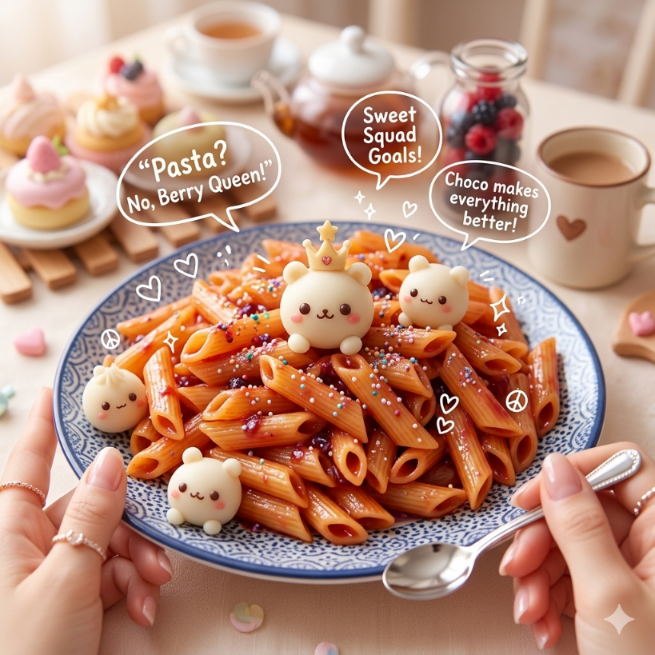
The Kawaii Food Doodles prompt transforms an uploaded food photo into a cute, playful and highly shareable food image with adorable doodle overlays. It keeps the original food as the hero subject while adding kawaii faces, blush cheeks, tiny arms and legs, hearts, sparkles, crowns, peace signs and soft hand-drawn sticker details. The result is designed for users who want food content that feels cheerful, appetizing and social-media ready without losing the real texture and identity of the dish.
This template is especially effective because it blends two visual languages: realistic food photography and cute Japanese-inspired doodle art. The uploaded image gives the AI a concrete food reference to preserve, while the prompt adds a cozy café mood, dreamy pastel atmosphere, bokeh background and playful cartoon overlays. That combination makes the image feel charming rather than artificial. The food should still look delicious, glossy and detailed, but it gains a personality that makes it more memorable and fun.
The prompt is structured to avoid one of the biggest issues with cute food generations: turning the entire image into a flat cartoon. Instead, it asks for ultra-realistic food textures, preserved ingredients, sharp focus and premium food photography, then layers the kawaii details directly on top of the food. This means the dish can remain recognizable while the doodles add emotion, humor and visual storytelling. It is a strong choice for desserts, pastries, drinks, pasta, burgers, bento boxes, pancakes, snacks and café-style dishes.
The doodle rules give the AI specific elements to create, but they also ask for integration and restraint. The overlays should feel adorable and well placed, not random or messy. The background direction adds a warm lifestyle feeling with hands, café ambience, soft lighting and complementary smaller food items. This makes the final image useful for Instagram, TikTok thumbnails, Pinterest visuals, café promotions, food blogs, stickers, cute menu graphics or playful product concepts.
Use this prompt when you want to make food feel alive, friendly and emotionally appealing. It works best with clear, appetizing reference photos where the main item is visible and has enough surface area for doodles. A clean cupcake, ramen bowl, coffee drink, sandwich, cookie, pasta plate or dessert can become a lovable character-like visual. Keeping the full prompt structure helps the AI balance cuteness with realistic food appeal, which is the key to making the image feel polished instead of childish or cluttered.
How to use this prompt
- 1
Upload one clear food image with a strong main subject. The dish, dessert, drink or snack should be visible enough for the AI to preserve its real texture and place the doodles directly on the food.
- 2
Choose the aspect ratio according to the platform. Square works well for feeds and stickers, while vertical is useful for Reels, TikTok covers, Pinterest pins and mobile-first food content.
- 3
Copy the complete prompt into your AI image tool with the uploaded food image. Keep the realism and doodle rules together, because the best results come from preserving the food while adding cute overlays.
Best use cases
Cafés, bakeries and dessert brands can use this prompt to create cute promotional visuals for cakes, cookies, coffee drinks, seasonal sweets and limited-edition menu items.
Food creators can make playful social media posts where dishes feel more emotional, friendly and memorable than a standard food photo.
Designers can use the result for sticker concepts, cute menu graphics, packaging moodboards, food blog headers or kawaii-inspired brand experiments.
Tips for better results
Choose food with a clean visible surface, such as a cookie, pancake, bun, drink foam or dessert top. The AI can place kawaii faces and small doodles more naturally on these areas.
Use bright, appetizing references. Dark or messy food photos can make the doodles harder to read and may reduce the cheerful kawaii feeling.
If the first result becomes too cartoonish, regenerate while keeping the ultra-realistic food texture rules. If it feels too plain, try a vertical ratio with more room for doodles and café atmosphere.
Common mistakes to avoid
A common mistake is uploading a crowded table photo. The prompt works best when there is one hero food item, not many competing plates or props.
Another mistake is expecting perfect readable speech-bubble text every time. AI-generated text can vary, so short cute phrases and simple doodles usually work better.
Do not remove the requirement to preserve the original food. Without it, the model may replace the uploaded dish with a generic cute dessert or cartoon snack.
Final recommendation
Use the Kawaii Food Doodles prompt when you want food content that feels cute, friendly and highly shareable while still looking appetizing. A clear food reference and the full structured prompt help the AI preserve the dish, add charming doodles and create a polished kawaii café-style image.