
Prompt guide
Complete guide for Tiny Human on Giant Iguana
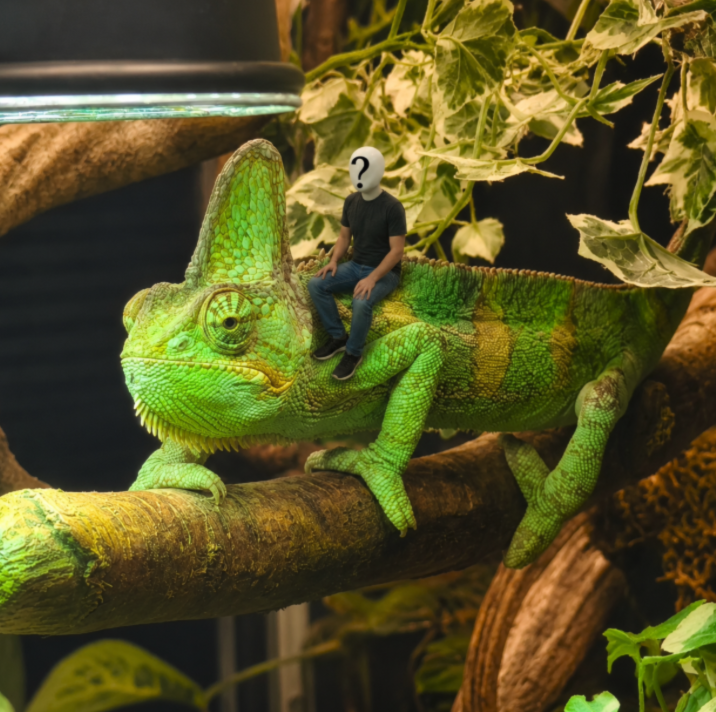
This Tiny Human on Giant Iguana prompt is built for a very specific funny image transformation: combining an iguana reference with a person photo to create a photorealistic miniature-human adventure. Instead of asking the AI to simply make a person small, the prompt defines an exact scale relationship, a precise sitting position, and the interaction rules needed to make the image look physically believable. The person should sit on the iguana shoulder near the neck and front leg, with the full body roughly matching the size of the iguana head. That level of control is important because giant-creature edits can easily fail when the person becomes microscopic, floats above the animal, or appears pasted into the frame.
The template is especially useful for playful social media posts, fantasy-realism edits, meme-style portraits, and humorous image-to-image scenes where identity still matters. It preserves the iguana, the terrarium environment, the person face, clothing, lighting, perspective, and contact shadows. The result should feel like a tiny adventurer resting on a living reptile inside a believable miniature jungle rather than a random collage. Because the prompt includes scale, placement, contact, atmosphere, quality rules, and validation instructions, it gives an AI image model much clearer guidance than a short prompt such as tiny person on iguana.
Use this prompt when you want a surreal but realistic visual that feels cinematic, funny, and surprisingly believable. It works best with a clear person photo and the provided iguana reference, then relies on the aspect ratio setting to decide whether the final result should feel like a square meme image, vertical social post, or wider cinematic scene.
How to use this prompt
- 1
Upload or use the iguana reference as the first image and upload a clear person photo as the second image. A full-body or three-quarter photo gives the model more information for the seated pose, clothing, identity, and scale. Avoid images where the person is heavily cropped, hidden by accessories, or too blurry to preserve the face.
- 2
Choose the aspect ratio according to where the image will be used. Square works well for memes and profile-style posts, vertical works well for stories or mobile feeds, and wider ratios make the terrarium feel more cinematic. The prompt already defines the position and scale, so you do not need to add extra placement instructions.
- 3
Copy the full generated prompt into your AI image tool together with both images. Keep the scale rules, validation rules, and negative instructions intact, because they prevent the most common failures: a floating person, a person placed on the branch, a normal-sized human, or an iguana that changes identity.
Best use cases
Funny social media edits where a real person appears inside an absurd but believable fantasy situation. The miniature scale and giant iguana concept make the result eye-catching without needing extra text, stickers, or complicated editing.
Personalized meme images for friends, creators, pet or reptile accounts, and fantasy-photo experiments. The prompt keeps the person recognizable while turning the scene into a tiny explorer moment, which makes the image feel custom instead of generic.
Creative portfolio tests for image-to-image composition, scale control, and realistic contact shadows. It is a useful prompt for showing how a structured prompt can combine two references into one coherent photographic scene.
Tips for better results
Use a person photo with visible clothing and body shape. The model needs enough visual information to create a believable seated posture on the iguana shoulder, so a close-up selfie may preserve the face but can make the body pose weaker.
Keep the iguana reference unchanged and avoid adding extra props. The strongest result comes from preserving the terrarium lighting, branches, plants, and depth of field while integrating only the miniature human with correct shadows.
If the first result is close but the person is too small, regenerate with the full prompt and emphasize the validation rule that the full body should be approximately the size of the iguana head. Aspect ratio changes can also help give the seated figure more room.
Common mistakes to avoid
Using a cropped or blurry person image. If the model cannot clearly read the face, clothing, and body proportions, it may create a generic tiny human instead of preserving the uploaded person identity.
Deleting the scale and placement rules. Without those instructions, the person may appear on the iguana head, on the branch, beside the animal, or at a scale that does not match the intended giant-creature illusion.
Adding too many new fantasy elements. Dragons, weapons, helmets, extra animals, or dramatic backgrounds can distract from the simple joke and make the final image less realistic than the original terrarium concept.
Final recommendation
Use Tiny Human on Giant Iguana when you want a funny, surreal, and photorealistic composite that still respects both source images. The best results come from a clear person photo, the provided iguana reference, and the full structured prompt with all scale, placement, contact-shadow, and validation rules preserved.